May 6th, 2026
Release Notes v0.3.0
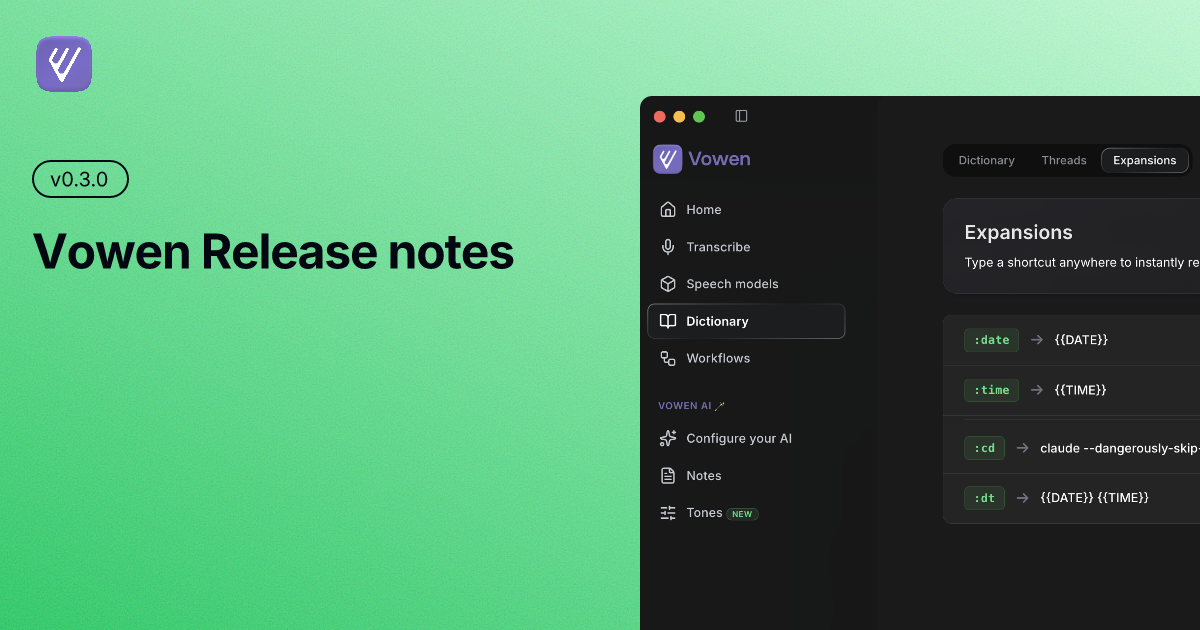
This update introduces Expansions — a system-wide text expander built right into Vowen — along with Tones on Windows, dynamic AI model updates, resource efficient mode for local Whisper, and several quality-of-life improvements.
New Features
Expansions: Type a shortcut like
:dateor:timeanywhere on your system and it instantly expands into the full text. Create your own custom expansions for emails, addresses, signatures, or anything you type often. Includes a guided tutorial to get started and built-in expansions out of the box.Tones on Windows: Tone profiles are now fully supported on Windows — customize how your transcriptions sound across different contexts, just like on macOS.
Dynamic AI Models: Available AI models are now fetched from the server, so new models appear automatically without requiring an app update.
Resource Efficient Mode: Use local Whisper models without keeping the server running in the background. The transcription server starts on demand and shuts down after, saving system resources.
Improvements
Command Mode Confirmation: Command mode now shows a confirmation banner before pasting, letting you review, copy, or cancel the result.
Workflow Trigger Phrases: Workflows now use trigger phrases directly instead of separate names, making them simpler to set up.
Keyboard Hook Stability: Improved reliability of global keyboard shortcuts, including guardrails against suppressing system shortcuts and better handling of overlapping hotkeys.
Filler Word Removal: Filler word stripping no longer removes newlines and text formatting from transcriptions.
Custom Instructions UX: Added discard banners and a confirmation modal when clearing custom instructions, so you don't lose work accidentally.
Built-in App Shortcuts: Built-in apps like Browser and Finder are now included in the app selection dropdown for workflows and expansions.
Fixes
Fixed forward/back mouse button hotkeys not registering correctly
Fixed provider logos not displaying properly in dark mode
Fixed bottom positioning for command mode recording indicator
Fixed enter key accidentally closing modals